![[PukiWiki]](image/pukiwiki.png "[PukiWiki]")
BGMとSE同時再生 †プログラムが複雑になってしまったのでクラス化した。とりあえず使い方だけ説明。SDカードには対応していない。 SoundPlayerの使い方 †SoundPlayerはSoundStreamとSoundMixerを使用している。 ■includeファイル #include "SoundPlayer.hpp" #include "TwinkleBeep04_11KHz_8bit_mono.h" // サウンドデータ ■SoundPlayerを11025Hzで再生する設定にして初期化 SoundPlayer::Initialize(11025); ■SoundPlayerはシングルトンなのでインスタンス取得する SoundPlayer& sound_player = SoundPlayer::GetInstance(); ■サウンドプレイヤーにデータを登録 引数は左からチャンネル,データ,データサイズ,ループするかどうかのフラグ int bgm_handle = sound_player.Append(0, TwinkleBeep04_11KHz_8bit_mono_wave, static_cast<int>(sizeof(TwinkleBeep04_11KHz_8bit_mono_wave)), true); ■サウンド再生 引数はAppendの戻り値 sound_player.Play(bgm_handle); ■サウンド停止 引数はAppendの戻り値 sound_player.Stop(bgm_handle); ■loop関数で毎回呼び出す sound_player.Update(); サンプルソース (SoundSample2.inoのみ) †#include <TinyScreen.h>
#include "SoundPlayer.hpp"
#include "TwinkleBeep04_11KHz_8bit_mono.h"
#include "hiyoko_01.h"
#include "jump_01_take2.h"
#include "Knockdown.h"
static const unsigned long FPS = 30;
static const unsigned long INTERVAL_TIME = 1000000 / FPS;
static const unsigned int BUTTON_LEFT_PIN = 45;
static const unsigned int BUTTON_RIGHT_PIN = 44;
TinyScreen tiny_screen = TinyScreen(TinyScreenPlus);
int version = 1;
unsigned long micros_time;
int bgm_handle;
int piyo_handle;
int jump_handle;
int piyo_jump_select;
int knockdown_handle;
unsigned int button_before;
void setup()
{
// 画面初期化
tiny_screen.begin();
tiny_screen.setBitDepth(TSBitDepth8);
tiny_screen.setBrightness(8);
tiny_screen.setFont(liberationSansNarrow_12ptFontInfo);
tiny_screen.fontColor(TS_8b_White, TS_8b_Black);
// ボタン初期化
pinMode(BUTTON_LEFT_PIN, INPUT_PULLUP);
pinMode(BUTTON_RIGHT_PIN, INPUT_PULLUP);
button_before = 0;
// サウンド初期化
SoundPlayer::Initialize(11025);
SoundPlayer& sound_player = SoundPlayer::GetInstance();
bgm_handle = sound_player.Append(0, TwinkleBeep04_11KHz_8bit_mono_wave, static_cast<int>(sizeof(TwinkleBeep04_11KHz_8bit_mono_wave)), true);
piyo_handle = sound_player.Append(1, hiyoko_01_wave, static_cast<int>(sizeof(hiyoko_01_wave)), false);
jump_handle = sound_player.Append(1, jump_01_take2_wave, static_cast<int>(sizeof(jump_01_take2_wave)), false);
knockdown_handle = sound_player.Append(2, Knockdown_wave, static_cast<int>(sizeof(Knockdown_wave)), false);
piyo_jump_select = 0;
sound_player.Play(bgm_handle);
micros_time = micros();
}
void loop()
{
unsigned long interval_time = micros() - micros_time;
SoundPlayer& sound_player = SoundPlayer::GetInstance();
if(interval_time > INTERVAL_TIME)
{
// ボタン判定
unsigned int button = 0;
if(!digitalRead(BUTTON_LEFT_PIN))
{
button |= 1;
}
if(!digitalRead(BUTTON_RIGHT_PIN))
{
button |= 2;
}
if(((button_before & 1) == 0) && (button & 1))
{
sound_player.Play((piyo_jump_select == 0) ? piyo_handle : jump_handle);
piyo_jump_select = 1 - piyo_jump_select;
}
if(((button_before & 2) == 0) && (button & 2))
{
sound_player.Play(knockdown_handle);
}
// 30FPS間隔で行う処理 (画面更新、ゲーム進行など)
char text[128];
tiny_screen.clearScreen();
tiny_screen.setCursor(0, 0);
sprintf(text, "FPS %lu", 1000000 / interval_time);
tiny_screen.print(text);
tiny_screen.setCursor(0, 12);
tiny_screen.print("Push button");
button_before = button;
micros_time = micros();
}
// 最速で行う処理 (サウンド処理など)
sound_player.Update();
}
実行結果 †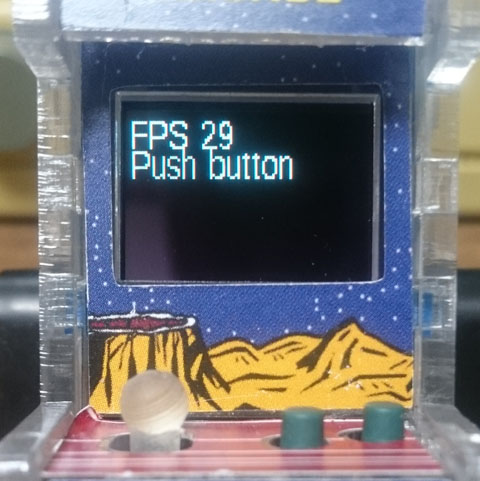 BGMは自動的に再生され左ボタンで「ひよこの鳴き声」「ジャンプ音」が交互に再生、右ボタンで「やられ音」が再生する。 サンプルプログラムのダウンロード † |


 SoundSample2.jpg